AI Was Clogging Our PR Queue. The Fix Wasn't Less Human Review
How GitHub’s stacked pull requests helped us keep human review while shipping AI-generated code faster.
2026-08-02 / 6 min read / By Kane Testa
Rapid iteration and shipping fast have become second nature to the teams I’ve worked in. But one issue that has only been amplified by the increase in development velocity is the bottleneck that comes with human review.
“Why don’t you just unblock yourselves by using a coding agent to review your code?” you might be asking. At Flowstate, we’ve found that a combination of human and agentic review is just about the sweet spot.
There is a new GitHub feature in town that we’ve been testing in private beta for a while now. It has allowed us to start merging pull requests at a rate much closer to the rate at which we’re raising them.
It’s called GitHub stacked pull requests, or stacked PRs, and it’s now available to the public.
You should give it a go.
What is a Stacked Pull Request?
A stacked pull request is a way of breaking a large change set into several smaller, more easily reviewed pull requests.
GitHub defines a stack as:
“An ordered series of pull requests that each represent focused layers of your change.”
Stacks now work directly on GitHub, and are easily manageable using the GitHub CLI. In fact, there’s even a gh-stack skill you can plug into your agent as soon as you’re ready. Find it here.
This concept isn’t new. In fact, there have been a few start-ups birthed from this concept (such as Graphite) and dozens of open source projects also toying with the theme for years. However, GitHub publicly supporting stacked PRs marks a significant shift in how software developers may approach pull requests.
Developers now have a stronger incentive to break feature development into a stack of smaller pull requests, reducing the cognitive load placed on reviewers. Let’s be honest: once a pull request exceeds 1,000 lines, keeping all of its context in your head becomes difficult. Coding agents amplify this problem because they can generate enormous changes from a single prompt. In fact, SmartBear’s 10-month study of code reviews at Cisco found that reviewer effectiveness drops sharply once a review exceeds about 200 lines of code, with 400 lines acting as a practical upper limit before defect detection degrades.
Stacked Pull Requests vs Dependent Pull Requests
How does this differ from just raising a pull request that is pointing at another branch instead of main?
On the surface, this might sound no different from raising a pull request that points at another feature branch instead of main.
The difference is that GitHub treats those pull requests as a single connected stack.
The code author doesn’t need to keep manually rebasing each branch or chasing reapproval whenever something lower in the chain changes. Instead, a large feature can continue moving through a series of short, focused pull requests.
Each pull request can be reviewed independently, while the same branch protections are applied across every layer of the stack.
When the stack is ready, you can merge:
- One pull request
- Part of the stack
- The entire stack at once
How to use Stacked Pull Requests in GitHub
Creating a Stack with the GitHub CLI
The most efficient way I’ve found to build a PR stack starts before you write any code.
Using your task-management software of choice, flesh out the feature you’re about to build and break it into clear, isolated pieces. Each piece should be small enough to become its own focused PR.
For example, let’s pretend we’re building a micro-frontend that requires an authentication layer and some API endpoints. I would break that work into three PRs:
- Authentication layer
- API endpoints
- Frontend UI
The order matters here. The auth layer sits at the bottom of the stack, the API endpoints build on top of it, and the frontend UI sits at the top.
You can then initialise the stack with a single command, using the branch names you’ve chosen:
gh stack init auth-layer api-endpoints frontend-uiFrom there, each part of the feature can be worked on and reviewed independently without holding up everything above it.
Reviewing a Stack in GitHub
Reviewing the code will still feel familiar.
The main difference is a reference to the stack beside the Open indicator on the pull request page. Clicking the stack icon shows every pull request in the stack that is awaiting review.
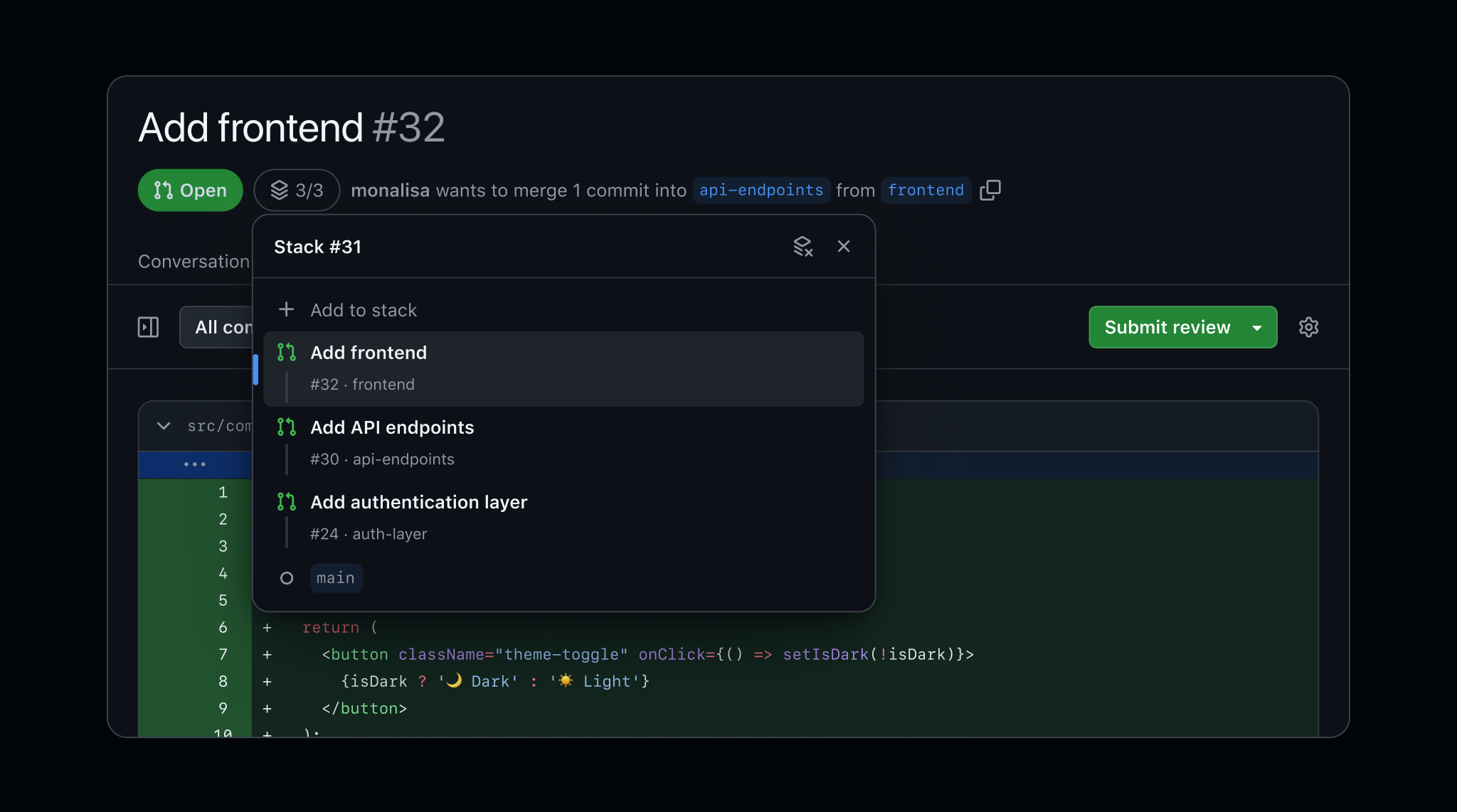
Instead of reviewing the entire feature in one enormous PR, you can work through each smaller change individually, with far less context to hold in your head.
Each pull request can be:
- Viewed independently
- Reviewed independently
- Approved independently
Once every pull request has been approved, the author can merge the entire stack into the target branch with a single click without manually rebasing each branch first.
How GitHub Stacked Pull Requests work under the hood
I’ve been following the progress of stacked diffs for a few years, mostly through Graphite, but I never quite pulled the trigger on using them myself.
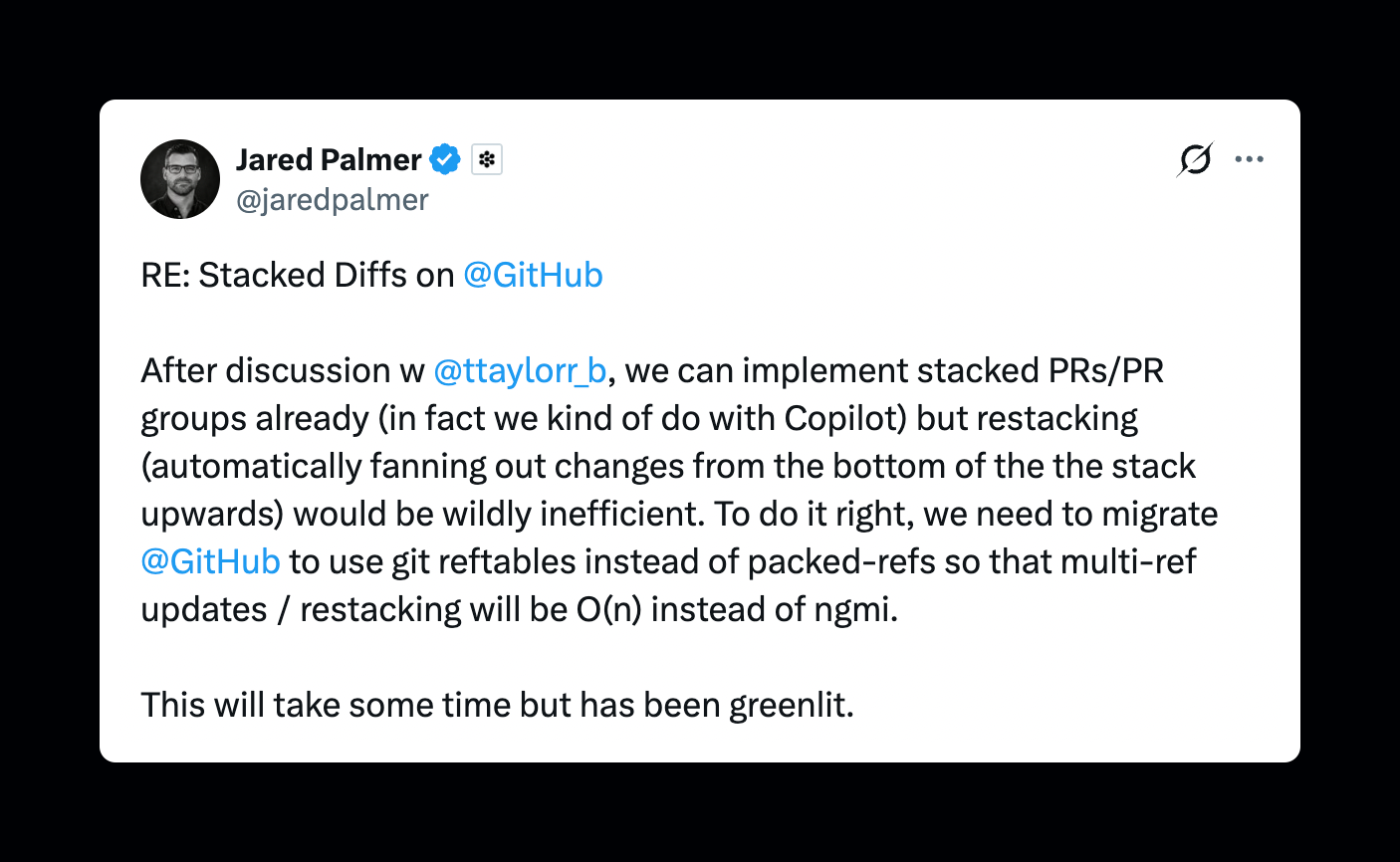
They properly caught my attention nearly a year ago when I saw an X post from Jared Palmer, who was a VP at Microsoft at the time.
Palmer announced that GitHub had greenlit the work required to migrate from packed-refs to Git reftables. This was an important technical change required to make automatic restacking efficient at GitHub’s scale.
Since then, I’ve had plenty of time to think about how much easier this could make working with stacked pull requests and have had a go at reverse-engineering it since joining the beta.
What is a Git Ref?
First, we must understand the purpose of a Git ref's.
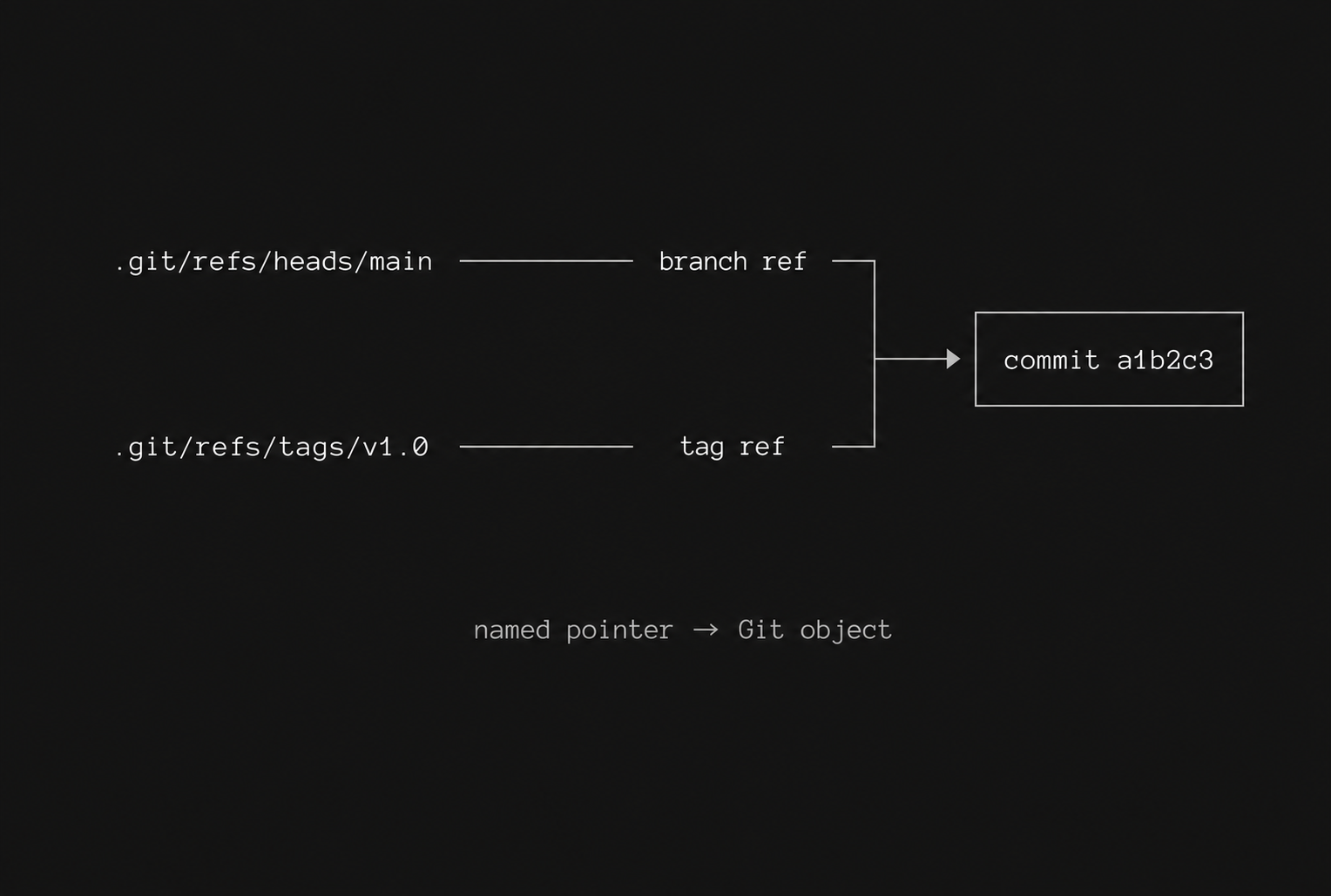
A Git ref is a named pointer to a Git object, usually a commit. Branches and tags are the most common examples.
In a traditional local Git repository, refs are stored inside the hidden .git directory. A branch may initially be stored as an individual text file:
How Git Refs previously worked
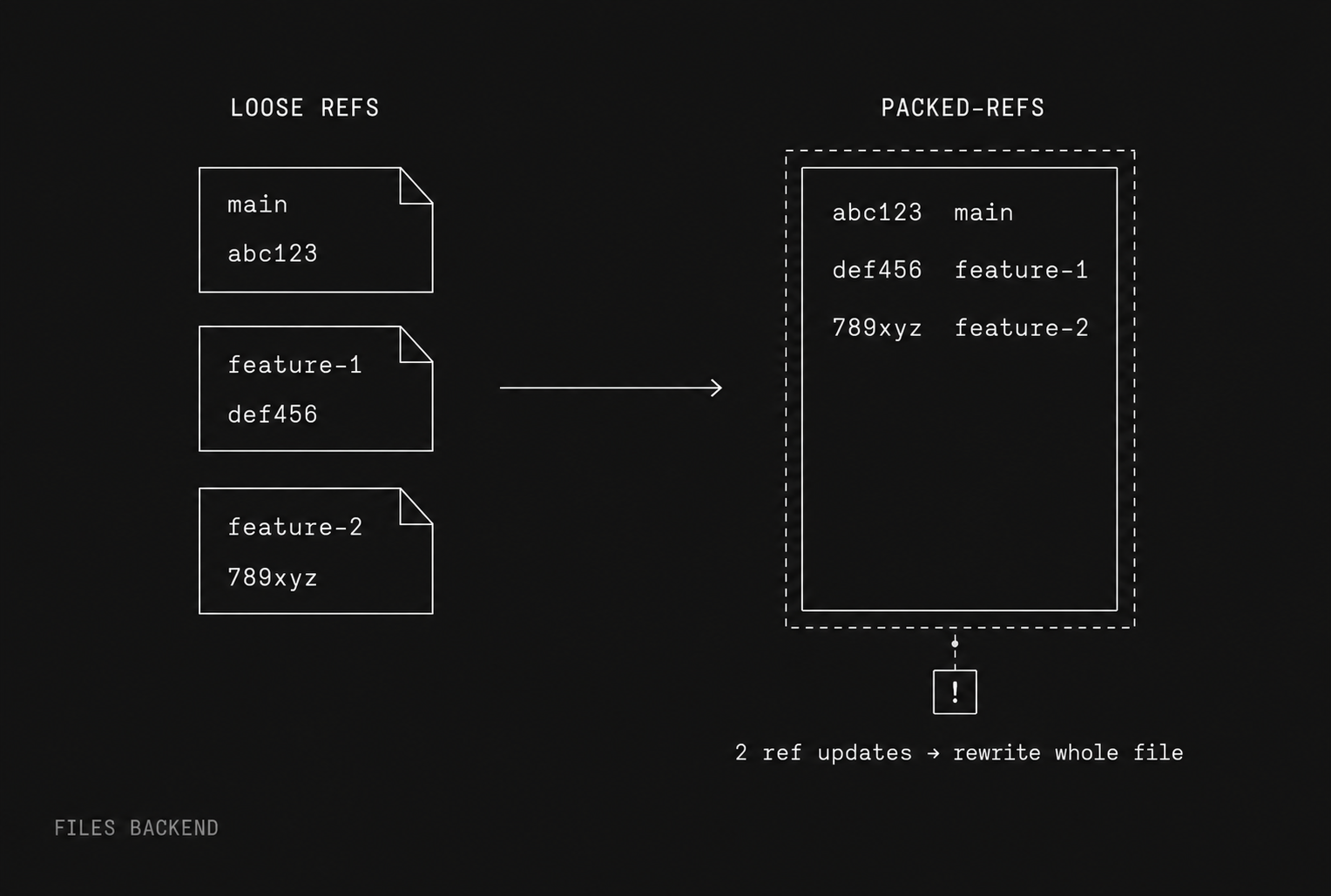
Traditionally, Git has used the files backend.
A new or recently changed branch may exist as an individual file:
.git/refs/heads/main
.git/refs/heads/feature-1
.git/refs/heads/feature-2
Each file contains the commit ID for that branch.
To avoid accumulating millions of tiny files, Git periodically combines older refs into one large text file:
.git/packed-refsConceptually, that file looks like this:
abc123 refs/heads/main
def456 refs/heads/feature-1
789xyz refs/heads/feature-2
This approach works well for ordinary Git usage, but it becomes expensive at GitHub’s scale.
If a repository has hundreds of thousands of refs, atomically updating several of them can involve:
- Locking the shared
packed-refsfile - Reading or copying a potentially enormous file
- Rewriting the file to reflect the changes
- Replacing the previous file
- Coordinating those changes with any newer loose-ref files
The Git documentation notes that an atomic update involving only two refs can require copying the entire packed-refs file.
Multi-ref writes also have weak atomicity when using the files backend. This means readers may potentially observe an intermediate state while an update is taking place.
The solution - How Git Reftables work
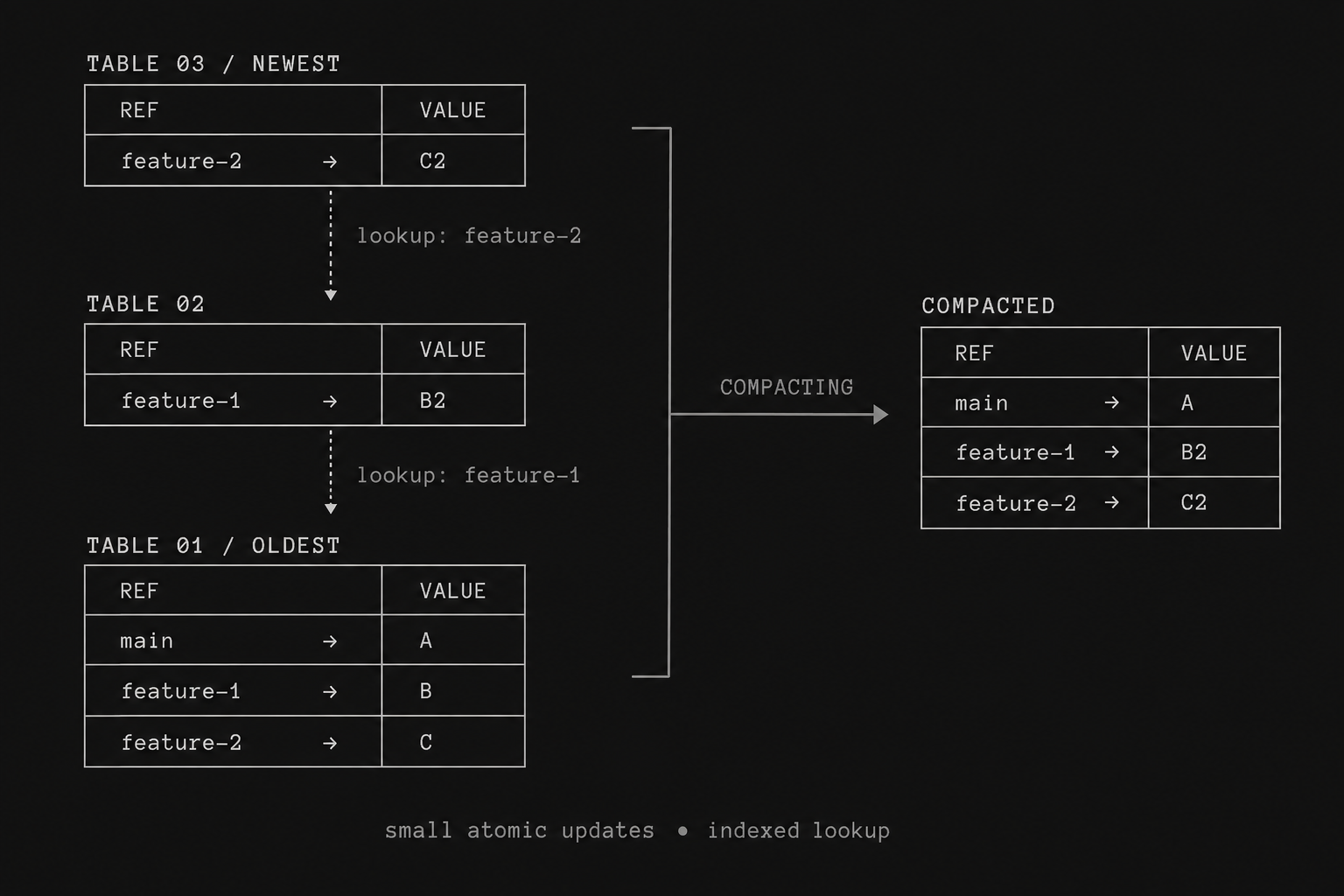
Reftable stores refs in a purpose-built, indexed binary table rather than as thousands of individual files combined with one enormous text file.
Updates are written as small new tables inside .git/reftables in a manner that basically represents your repo as follows:
Existing table:
main       → A
feature-1  → B
feature-2  → C

New update table:
feature-1  → B2
feature-2  → C2
Git reads these tables together, with newer entries overriding older ones.
The tables are periodically compacted in the background, somewhat like an LSM-tree database.
Reftables provide:
- Near-constant-time lookup of an individual ref
- Updates proportional to the number of changed refs
- Atomic multi-ref transactions
- Efficient deletion using tombstone records
- Lower storage requirements
- Fewer filesystem operations
- Integrated ref and reflog storage
These properties make reftable a much better fit for GitHub stacked pull requests.
Why Reftables matter for Stacked Pull Requests
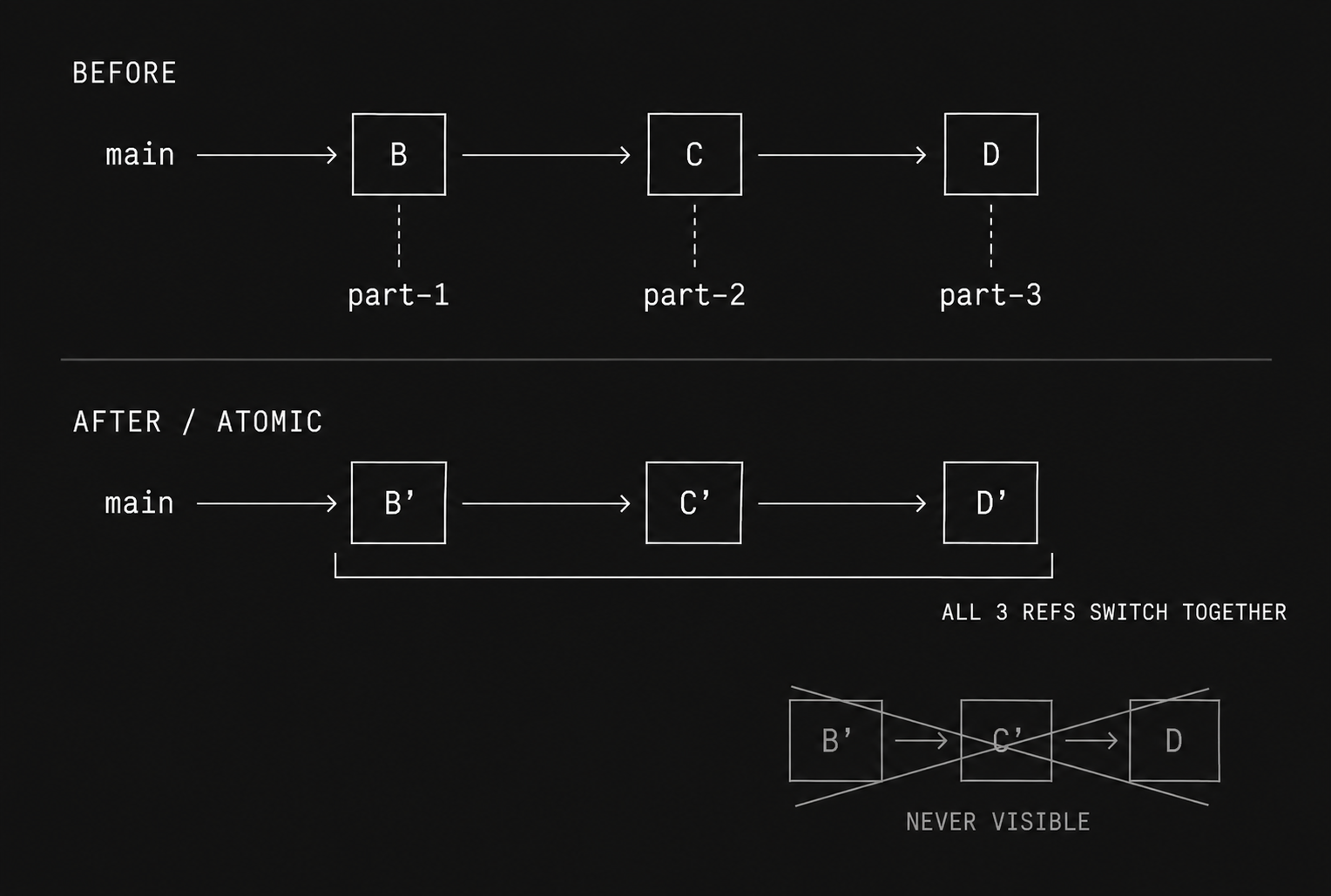
Imagine a stack containing three pull requests:
main → PR 1 → PR 2 → PR 3Each pull request has its own branch ref:
refs/heads/part-1 → B
refs/heads/part-2 → C
refs/heads/part-3 → D
If PR 1 changes, GitHub must restack the later pull requests by rebasing them:
Before:
part-1 → B
part-2 → C
part-3 → D

After:
part-1 → B′
part-2 → C′
part-3 → D′
GitHub must update all three branch refs together.
It cannot expose a partially restacked state such as:
part-1 → B′   updated
part-2 → C′   updated
part-3 → D    still old
With packed-refs, changing those three refs could require expensive operations against storage containing every ref in the repository.
At GitHub’s scale, that makes automatic restacking slow and operationally risky.
With reftables, GitHub can create a single atomic transaction containing only the affected refs:
transaction {
  part-1 = B′
  part-2 = C′
  part-3 = D′
}
Readers see either the entire old stack or the entire new stack and never an intermediate version.
What does “Restacking will be O(n)” mean?
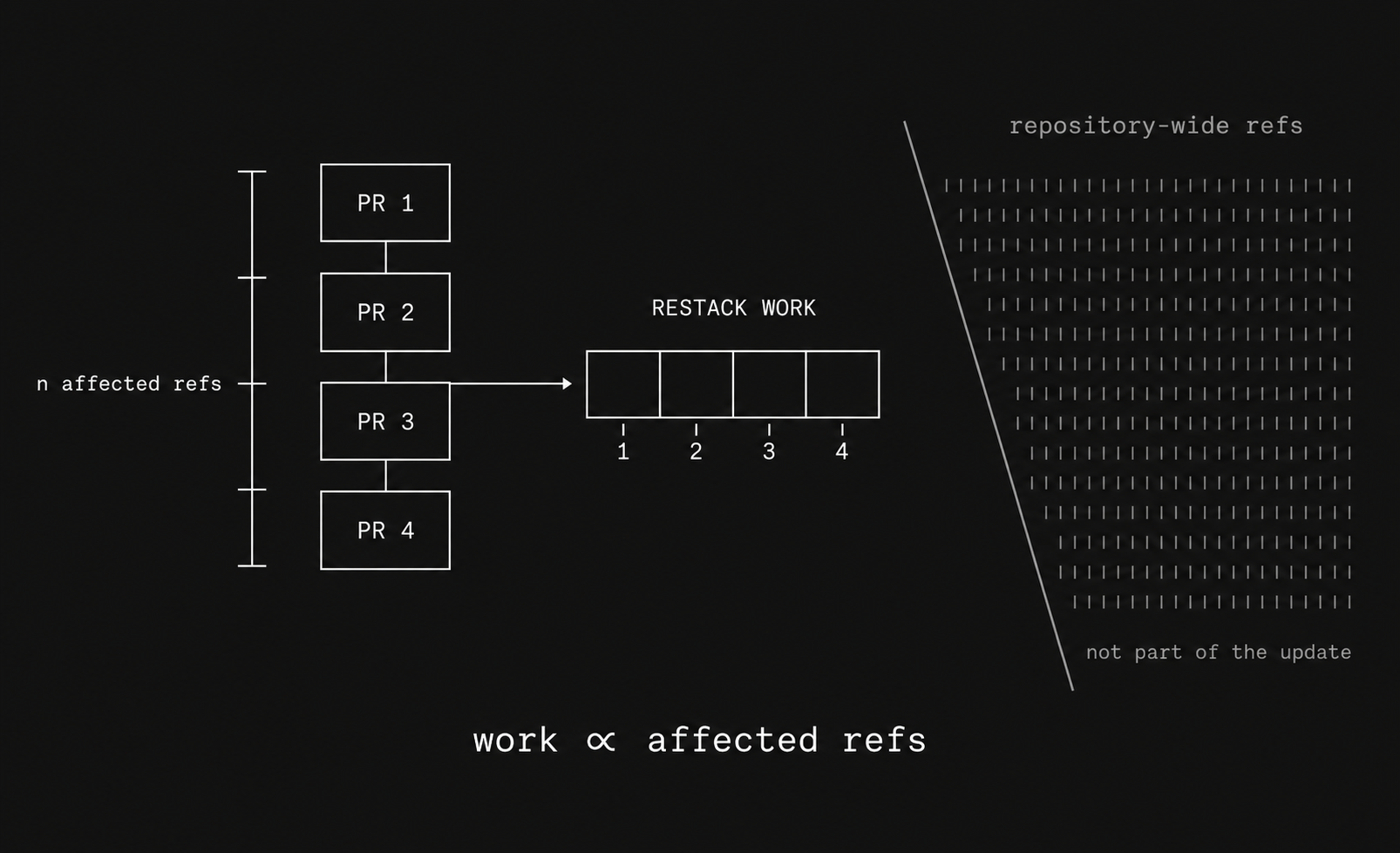
Jared Palmer’s joke that “restacking will be O(n) instead of ngmi” means that the amount of work required to restack a change will scale approximately with the number of affected refs in the stack.
In practical terms:
nrepresents approximately the number of refs that must be updated.- The work scales with the size of the PR stack.
- GitHub no longer needs to wrestle with a large, repository-wide representation of every ref.
The surprising part is that GitHub could already model stacked pull requests at the product level.
The difficult part was making automatic, atomic restacking efficient enough to operate across GitHub-scale repositories.
Loose refs, packed-refs and reftables all represent the same branch and tag information. Reftable changes the underlying storage backend and not Git’s user-facing branch model.
Why Stacked PRs matter in the age of AI-Generated code
Coding agents allow us to generate code faster than ever, but they do not remove the need for human judgment… yet. I’m sure some would argue the opposite, but it's up to your team to decide the best tools for your exact circumstance.
If anything, their ability to produce enormous changes makes review structure even more important.
GitHub stacked pull requests give us a way to preserve human review without forcing development velocity back to pre-agent speeds. Large features can be broken into smaller units, reviewed with less cognitive overhead and merged without the manual rebasing traditionally associated with dependent pull requests.
For us at Flowstate, that combination has struck the right balance:
- Agents help us write and review code faster.
- Humans retain responsibility for understanding and approving changes.
- Stacked PRs keep both sides of that workflow moving.
That is what makes GitHub’s native support for stacked pull requests feel like more than another GitHub feature.
It changes the shape of the pull request itself to better match the way software is now being built.

Kane Testa explores how software and AI are shaping the future of sport. He writes between fixing, making and breaking things at Flowstate, and away from the desk is usually surfing, going to gigs or catching up with friends.